Free Domain Rating (DR) Checker
Enter up to 10 websites, one per line, to check their Domain Rating.
What Is a Domain Rating Checker and How Does It Work?
A domain rating checker is an online tool that returns a website’s Domain Rating (DR), a single score that reflects the quality and quantity of the site’s incoming links. DR runs from 0 to 100, and it describes the backlink profile of an entire domain rather than one page, which is why SEO professionals use it as a fast first filter when comparing sites.
The score matters because search engines use backlinks to help discover and rank content, so a checker gives you a quick read on link quality without a full link report. In my own audits I run the check first, since a surprising number can reshape the rest of the review.
A bulk checker saves time because it scores several domains in a single run. Our Domain Rating Checker, built on the Ahrefs API, checks up to 10 sites at once, so you can line up a client against its closest rivals without testing each domain separately.
What Is Domain Rating (DR) in SEO?
Domain Rating (DR) is a metric created by Ahrefs that scores a website on the quality and quantity of its external backlinks. Some tools label the same idea a Website Rating.
DR reads link sources, not outcomes. It ignores organic traffic and keyword rankings, and while a checker may show estimated site traffic beside the score, DR itself does not use it. What lifts it is the count of unique domains pointing at a site, meaning its referring domains, together with how respected they are.
Because DR is a relative metric, a low or average number only means something next to similar sites in the same niche. I also read it as a hint of brand credibility: when a newcomer’s DR sits near an established rival’s, the link work is paying off.
How Is Domain Rating Calculated?
The DR formula weighs multiple factors about the sites that link to a target and converts them into one score on the Domain Rating scale. The published method has five steps:
Count how many domains link to the target website.
Look at the authority of each domain that links in.
Check how many sites each of those domains links to.
Run the formula to produce a preliminary figure for every site.
Plot those figures on the final DR scale.
The final scale is a logarithmic scale, so the gap between DR 82–83 is much bigger than the gap between DR 22–23. The higher a site climbs, the harder it becomes to gain even a few more points.
Under the hood, the checker judges link popularity across a whole website by reading its referring web-pages. It also counts the unique external sites behind them and the outbound links each of those sites publishes. When a source starts backlinking to many other destinations, the points passed on by those linking websites are reduced, so a source that links to fewer sites passes more value to each of them.
Why Should You Check Domain Rating?
A webmaster or SEO expert checks Domain Rating to see how a site’s link standing compares with rivals before deciding where to spend effort.
The result helps identify high-authority web pages, gauge website performance and spot top-ranking domains worth studying. Some people call the underlying idea website authority or domain authority, yet those labels describe a general concept rather than one vendor’s number, so always state which metric you quote.
Context decides what a score means. Ahrefs offers a rule of thumb: a site is doing well when its DR is higher than, or close to, that of similar sites. In less competitive niches a score of 50 to 60 is often treated as good, and the highest-scoring sites are usually described as top-performing
Page-level checks add detail. Ahrefs studied about 920 million pages and found that pages with more domains linking to them tended to attract more search visits. It also notes that the standing of the linking page counts for more than that of its domain, so I examine the links of any particular page I plan to promote.
How Do You Use a Domain Rating Checker?
You use a domain rating checker by entering a domain, running the check and reading the DR and traffic figures it returns.
- Enter the domain or page you want to test.
- Submit the form and wait a few seconds.
- Read the DR and traffic results, then save the report if the tool allows it.
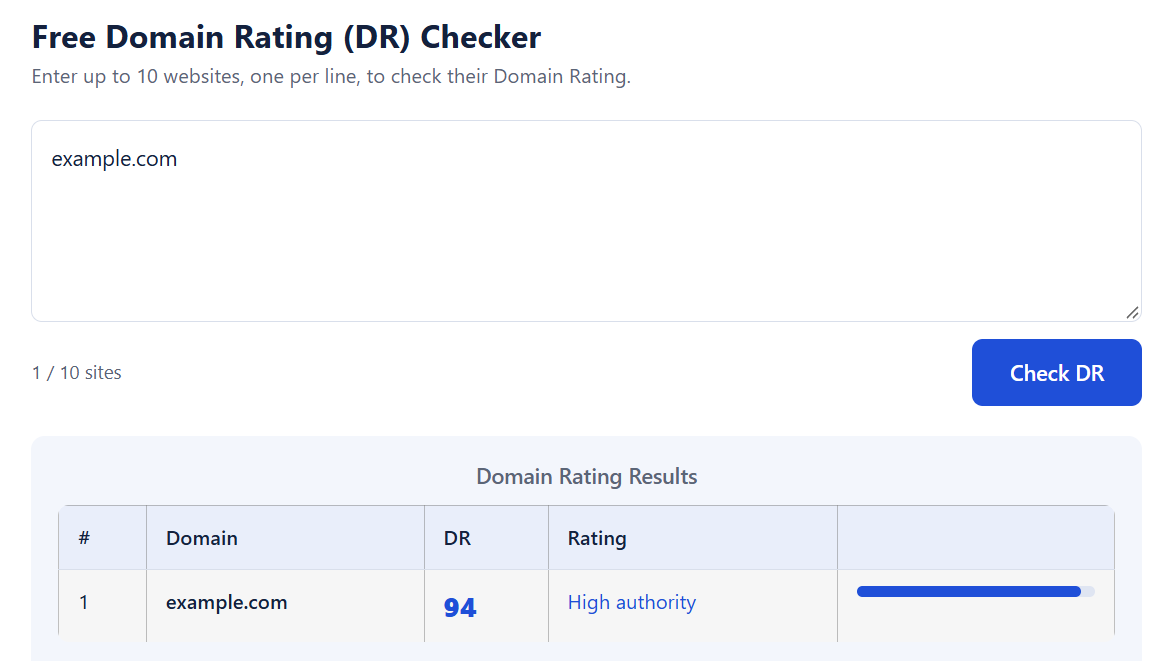
Precision matters at the input stage. Type the exact domain, because the www and non-www versions of a site can carry different metrics. Our Domain Rating Checker is a bulk tool that scores up to 10 sites per run, which is enough to compare a client with its closest competitors in one pass.
Away from web forms, the SEO Toolbar from Ahrefs is a browser extension for Chrome and Firefox that shows DR and page-level scores while you browse, and a free API lets developers pull DR for as many domains as they need. Because DR gives direct backlink power analysis, I schedule monitoring for client domains once a month and compare each result with the previous one.
How Can You Improve Your Domain Rating?
Earning backlinks from more unique websites is the only way to raise your Domain Rating. Those links must be dofollow, because a source that links with nofollow adds nothing, and the second, third and subsequent links from the same site do not add points.
Quality of the source matters as well. The DR juice a site passes on is shared among its outgoing links, so a selective source helps more than a crowded one. Ahrefs also found a correlation between the number of domains linking to a page and the traffic it earns, which is why it advises aiming backlinks at pages you want to rank rather than chasing the score itself.
Target selection is where the work happens. A Backlink Checker shows what you already hold, a Broken Link Checker audits dead links, and DR helps you vet link prospects, find outreach opportunities, assess guest posting sites and support client prospecting. Prefer sources that are topically relevant, and piggyback on the places your rivals already earn links from.
How Does URL Rating Differ From Domain Rating?
URL Rating scores the backlinks of a single page, whereas Domain Rating scores the backlinks of an entire site. Both are plotted on a 100-point scale, and a page’s URL Rating reflects the strength of the links pointing at that page alone.
Behind the scenes, the formula applies math and coding magic to produce raw scores, and ordering sites by those values is what makes the final ranking so granular. Treat both numbers as an SEO concept for judging link quality, not as a ranking guarantee. A page rated 65, for instance, can live on a domain with a lower DR, because the two scores read different sets of links.
To lift one page, earn links with shareable content such as infographics, pitch industry blogs and secure curated links. Relationships with editors, plus collaborations and partnerships with other brands, open further link opportunities.
What Is a Good Domain Rating Score?
A good Domain Rating is one that is higher than, or close to, the scores of similar sites in your niche, because DR only means something in context. A higher score is generally judged more credible and trustworthy, but the label always depends on who you are measured against.
Competition changes the picture. A DR25 site can draw more search traffic than a DR35 site, since the level of competition and the traffic potential of each niche vary. Neither number settles how either site will appear in SERPs. Ahrefs examined 218,713 domains and saw DR track search rankings well, yet it stresses that the study shows only an association and cannot prove causation.
To move a score up, I favour reputable sites, strong pages and steady link building. Useful guides and sharper content optimization give editors a reason to link, and a higher URL Rating also signals better URL credibility for individual pages.
Why Did My Domain Rating Drop?
A Domain Rating drops mainly when fewer domains link to a site, or when the sites that do link start pointing at many other places.
Likely cause | What to check | What to do |
Fewer domains linking in | Count the domains that link in, across two checks | Replace the lost links |
Sources now link to many other sites | Review each source’s other links | Favor sources with shorter lists |
Normal movement | Recheck after the next update | Wait before acting |
Ahrefs’ web crawler refreshes scores in near real-time as linking patterns emerge, and its formula weighs link diversity, so any change in the mix of sources can move the number. Ahrefs also says DR ignores link spam, domain age and traffic, so a drop points to link changes rather than those factors.
Before reacting, treat short-term dips and spikes with caution. Paste the domain one URL per line, press the Check DR button press the Check DR button and compare the result with your last saved report. If the number stays down, run SEO audits to trace the links you lost.
Frequently Asked Questions
Checking Domain Rating monthly is enough for most sites, because scores usually move in small steps. A monthly rhythm shows meaningful movement without making you react to scores that fluctuate briefly.
Consistency matters more than frequency. Use a checker that returns accurate figures, save each run with Export into Excel, and apply result filtering where a plan offers it to isolate the domains that moved. Then track the number of linking domains, the overall link patterns and the expected ranking potential to see whether a decrease is real.
Side tools help too. A domain age lookup and a PageRank check are handy for vetting a source. Ahrefs also suggests asking whether a link source will still exist in six months, a question worth repeating at each review.
Yes: our Domain Rating Checker lets you check up to 10 sites in a single run. That makes it quick to compare your own domain with several competitors or to screen a short list of link prospects without repeating the check for each one.
Our Domain Rating Checker pulls its DR scores through the Ahrefs API, so the data comes straight from Ahrefs’ own index. That means the numbers you see use the same Domain Rating scale described above, from 0 to 100.